Pipeline Dashboard
The pipeline view your CRM should have shipped ten years ago.
Every deal ranked by real signals. Risk surfaced before the deal slips.
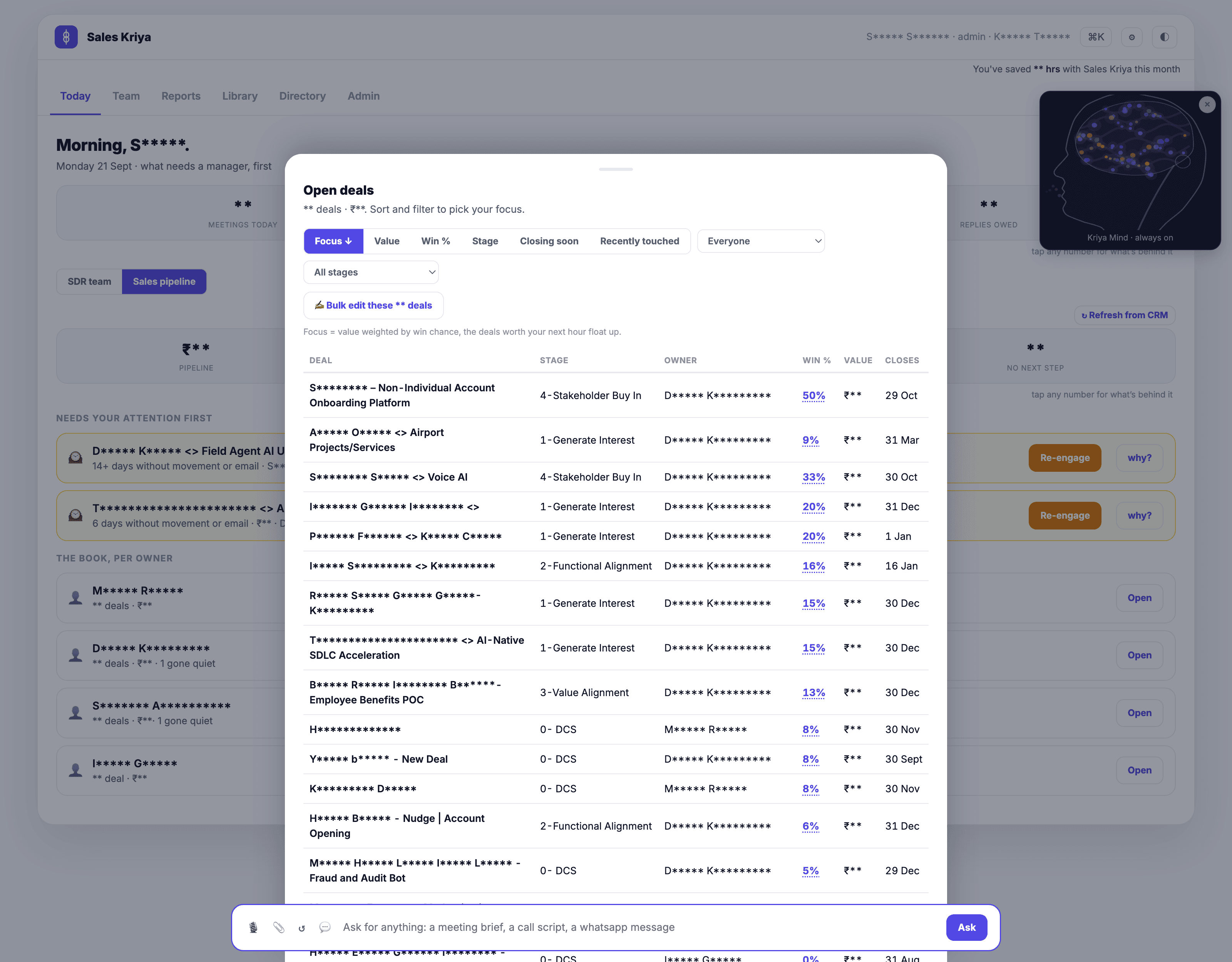
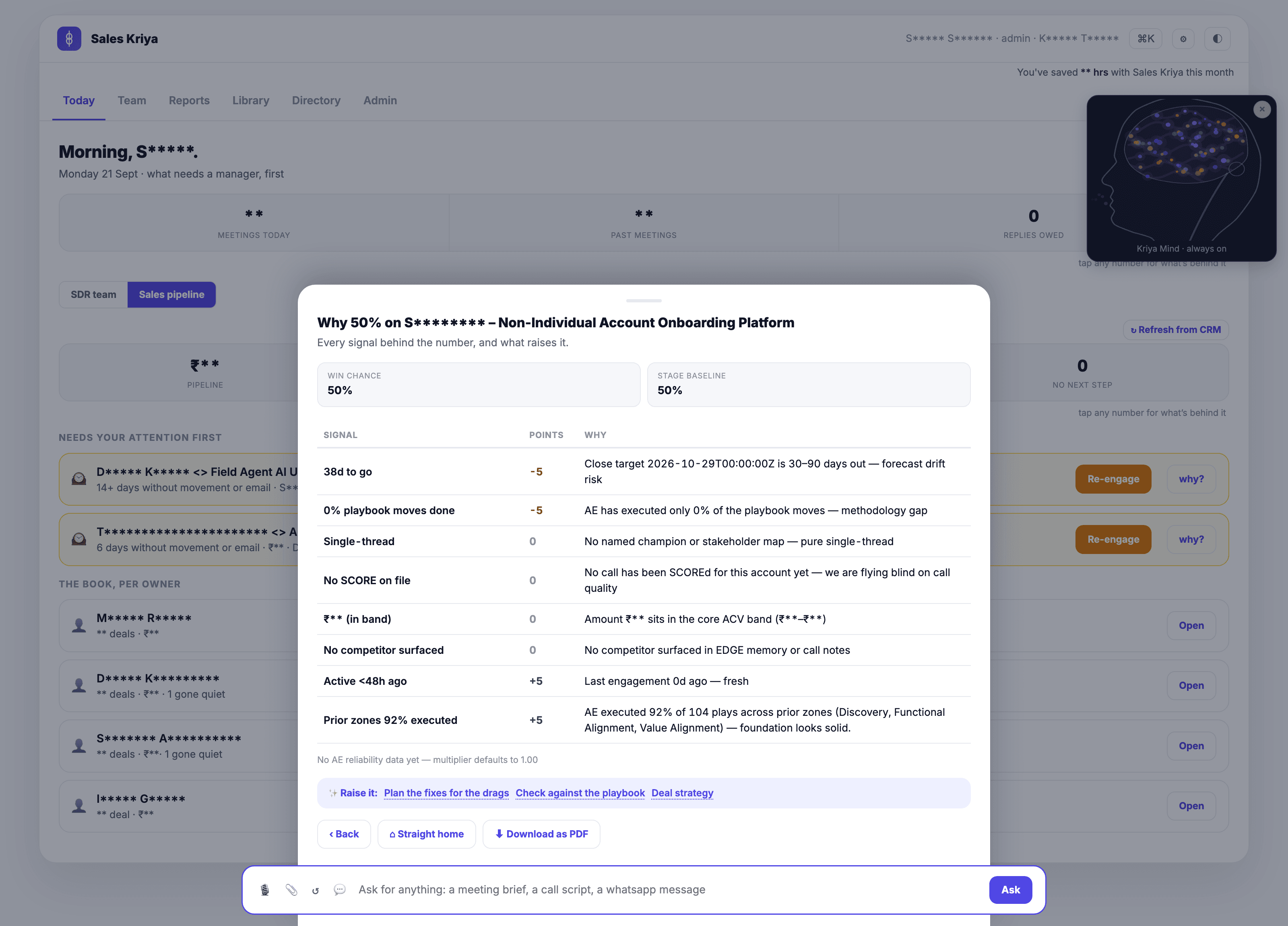
Your CRM shows you all the deals. It does not tell you which ones need you today. Sales Kriya does. P0, P1, P2 rankings by real signals. Movement flagged automatically. Every score explained in a sentence a rep can act on.
Powered by Kriya Mind AI, the live memory behind every draft, deck and answer.
One view
Every deal, one line, ranked by what needs you today.
Need action this week
At-risk deals with a why-it-is-at-risk sentence. Not a colour code. A sentence the rep can act on.
On track, need light touch
Deals with movement in the last week. Stage advances, stakeholder additions, positive signals in email or on calls.
Parked or long horizon
Long-cycle deals. Sit tight, quarterly touch, revisit at the next signal.
Under the hood
Signals that drive the ranking.
- Stage advance or slip. The deal has moved forward, or it has stayed in the same stage past its usual cycle length.
- Close date slipping. The rep has pushed the close date more than twice. Flag.
- Champion change. The champion has left, has been reassigned, or has gone quiet.
- Stakeholder coverage. The deal is single-threaded. One name, one email thread, one point of failure.
- Competitor mention. A named competitor came up on the last call. Change of context.
- Silence pattern. Days since the last touch. A deal that has been quiet for three weeks is a different animal than one active last Thursday.
Two views
Rep view. Manager view. Same data, right scope.
Rep view
Own deals only. Three deals that need action today. Every P0 explained. Every next step captured. Nothing else, so nothing else pulls their attention.
Manager view
Full team. Per-rep drill down. Coverage vs target. At-risk deals across the team, with the specific rep and account. So the Monday review is 15 minutes, not 60.
Scoping is enforced at the data layer. A rep never sees another rep’s deals. This is not a permission you can toggle off.
Best fit
Who this is built for.
Sales managers
Run weekly pipeline reviews on signals, not on the CRM spreadsheet.
CROs
Prep for board updates with a forecast that has evidence under every commit deal.
Reps
Want to know which 3 deals matter today. And why.
Common questions
Frequently asked.
How does the P0, P1, P2 ranking work?
The ranking blends CRM signals (stage, close date, deal size), engagement signals (last touch, stakeholder coverage, champion strength), and risk signals (stage stuck, close date slipping, competitor mentioned). Deals that need action this week land in P0. Deals on track land in P1. Deals parked or long-horizon land in P2.
Does the dashboard update in real time?
Yes. Every deal event, every meeting, every email refresh triggers a re-score. You will not see yesterday’s pipeline while you are in a Monday review.
Can I customise the risk signals?
Yes. The default risk signals are a starting point. On setup we tune them to your motion. If closed-lost analysis shows your team loses to silence more than to competitors, silence gets weighted heavier.
Does it work with Salesforce, HubSpot, both?
Both. And Close, and Pipedrive. The dashboard reads the CRM as its own source of truth. It never asks reps to update a second system.
Can reps see other reps’ deals?
No. Reps see their own deals only. Managers see the team, plus per-rep drill-down. Enablement and RevOps see cross-team patterns. The scoping is not optional.
How is this different from Clari or Boostup?
Clari and Boostup are forecasting products for the CRO. This is a working dashboard for the rep and the manager. Rep-first for the daily action. Manager view for the weekly review. Both show why a deal is at risk in a sentence, not a colour code.
See the pipeline your reps and managers will actually use.
Book a walkthrough or start pay as you go. No monthly commitment.